
September 3, 2026 · 6 min read · Inventory
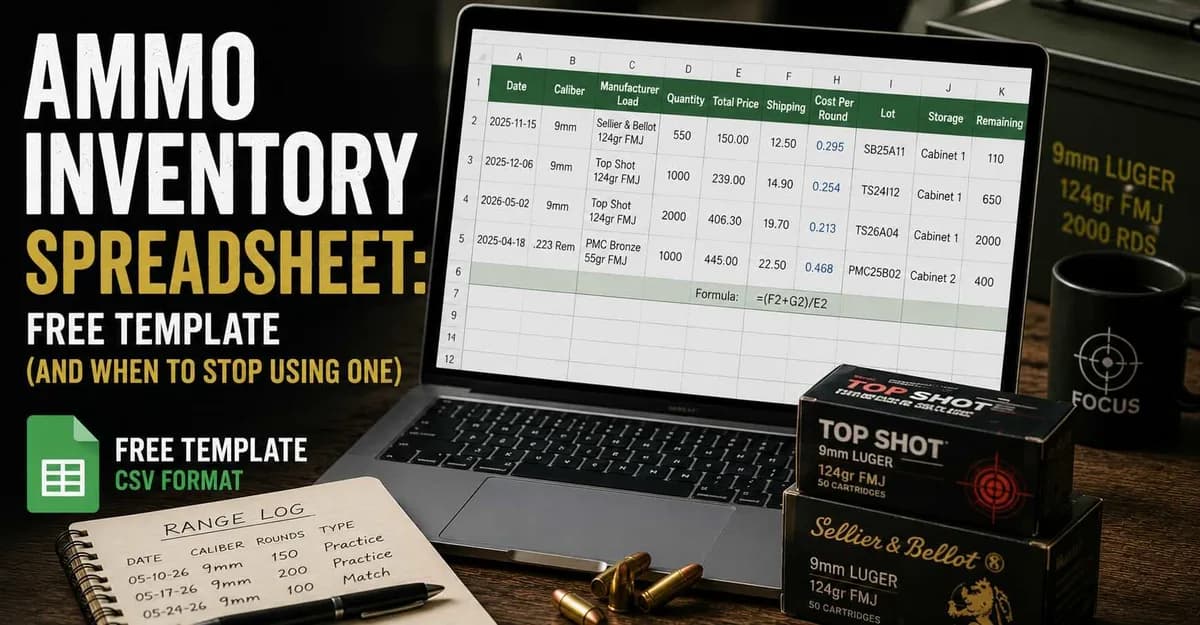
If you came here for a spreadsheet, take it — it is right below, no email required.
The rest of this article is the part most template pages leave out: which columns actually earn their place, the one formula that does the real work, and the point where a spreadsheet stops being the right tool. We build an ammo tracking app, so we have an obvious bias — which is exactly why the honest version of that last section matters. AmmoKeep is built by shooters, for shooters, and a spreadsheet is where most of us started.
Download the template
Two files, plain CSV, opens in Excel, Numbers, LibreOffice or Google Sheets:
- Ammo inventory template — one row per purchase
- Range log template — one row per session
Both include example rows so the format is obvious. Delete them and start with your own.
One note if you are outside the US: the files use commas as separators and a dot as the decimal mark. If your spreadsheet opens everything in one column, import it and pick "comma" as the delimiter instead of double-clicking the file.
Why one row per purchase, not per caliber
This is the single decision that determines whether your sheet is useful in a year.
The intuitive layout is one row per caliber with a running total: "9mm — 2,400 rounds". It is easy to maintain and it answers exactly one question, badly. What it cannot tell you is what those rounds cost, because they came from different purchases at different prices.
One row per purchase costs a few more seconds and gives you price history, average cost, and the ability to compare offers. You can always sum rows to get the total. You can never split a total back into purchases.
The columns that matter
| Column | Why it is there |
|---|---|
| Date | The actual day, not the month. Price history needs resolution. |
| Caliber | Obvious, but keep the notation consistent — "9mm" and "9x19" in the same sheet will break every filter you write. |
| Manufacturer + Load | Grain weight and bullet type. Without it you are comparing different products. |
| Quantity | Rounds in this purchase. |
| Total Price | What you actually paid for the ammo. |
| Shipping | Separate column, deliberately. See below. |
| Cost Per Round | The calculated column. The one number you compare with. |
| Lot | Matters more than most people expect — see the note on rifle ammo. |
| Storage | Only if you use more than one cabinet. Otherwise delete it. |
| Remaining | What is left from this purchase. |
Shipping gets its own column rather than being folded into the total, because you want to be able to answer both questions later: what did the ammo cost, and what did getting it here cost. Ammo is heavy, and on small orders shipping moves the per-round number more than most sale prices do.
Delete what you will not fill in. A column you skip three times in a row is worse than no column, because it makes the sheet look maintained when it is not.
The one formula
Everything else in the sheet is data entry. This is the only calculation you need:
Cost Per Round = (Total Price + Shipping) / Quantity
In the template, with the header in row 1, that is =(F2+G2)/E2 in column H.
Format it to three decimal places, not two. The difference between $0.239 and $0.243 disappears at two decimals, and over 1,000 rounds it is a real amount of money. If you would rather not deal with the formula at all, the cost per round calculator does the same arithmetic and compares two offers side by side.
Logging what you shoot
The inventory sheet alone gets you halfway. Without consumption you know what you bought, not what you have or how long it lasts.
The range log template keeps this to five fields you can fill in before you leave the parking lot: date, caliber, load, rounds, session type. Add the firearm if you own more than one in the same caliber — otherwise skip it.
The reason to track session type separately is that match ammo usually costs more than practice ammo. If the two are mixed in one number, your average cost per round is wrong, and it is wrong in the direction that makes budgeting harder.
Where a spreadsheet stops working
A spreadsheet is genuinely good at this up to a point. Being specific about where that point is:
It holds up well when you shoot one or two calibers, buy a few times a year, and update the sheet at your desk.
It starts to strain when:
- Remaining stock needs manual math. Every session means finding the right purchase row and decrementing it. Miss one and every downstream number is quietly wrong.
- You want a forecast. "How many weeks of 9mm do I have left" needs average consumption over time against current stock. Doable with formulas, annoying to maintain.
- You are at the range. Nobody opens a spreadsheet on their phone in a parking lot. Sessions get logged "later", and later often means never.
- Lots matter. For rifle ammo, point of impact can shift between manufacturing lots. Knowing which lot is left in the cabinet, and which rifle it was zeroed with, is a lookup a flat sheet handles badly.
None of these are spreadsheet failures exactly. They are the difference between a record and a tool.
So: spreadsheet or app?
Honestly: if you shoot one caliber a few times a year, the template above is enough and you can stop reading.
If you are decrementing rows by hand after every session, or you have stopped updating the sheet because it happens after you get home, that is the signal. That is the workflow AmmoKeep was built around — logging a session takes seconds on a phone, remaining stock and cost per round update themselves, and per-caliber forecasts fall out of the data you already entered. You can see what the app tracks and which analytics it includes before deciding.
Either way, the important part is the habit, not the tool. A maintained spreadsheet beats an app you stopped opening.
AmmoKeep – built by shooters, for shooters.